- File Upgrader– Upgrade files to the current version of Revit
- Attach It – Attach any file (PDF, Word, XLS…) to your Revit file
- File Version Check – Cancellable dialog when attempting to upgrade files from a previous version & reporting tools for existing Revit files
- Select Intersecting– Select all elements that physically intersect a selected element
- Level Displacer– Create a displacement set for each level in your project
- View Parameter for Detail Items – Create a “live” View parameter for every detail item
- Topo From Lines – Create a toposurface from a set of model lines
- Section Box Fit – Create a rotated section box to fit a selected wall
- In-N-Out Family Parameters – Edit family parameters in Excel and import them back to Revit to modify the families
- Family Security Guard – Require a password before allowing users to edit families
- Image-O-Matic – Animate your Revit model – works with phases and family instances
- Keyboard Shortcut Tutor – Become a Revit speed demon by learning the keyboard shortcuts
- Move To Analytical – Move the physical model of beams or floors to the location of their analytical model
- Level Generator – Create multiple levels quickly and easily
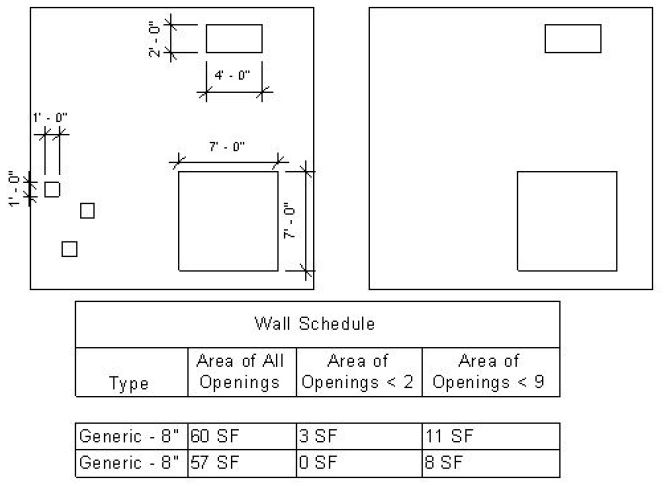
- Wall Opening – Compute area of wall openings of various sizes
Attach It
Attach any file (PDF, Word, XLS…) to your Revit file
File Version Check
File Upgrader |
This tool allows you to specify a source folder containing Autodesk® Revit® files and have every file in that folder upgraded to the current version of Revit. All files are saved in a user-specified destination folder. Download this program at the Autodesk App Store.
Create a “View” text parameter for Detail Items. Then use this app to set the value for every Detail Item. The app will keep these values automatically updated as view and detail items are created and changed.
View Parameter for Detail Items
Create an instance parameter named “View” for the Detail Items category. Then this tool will automatically set and update that parameter when Detail Items and their Views are created and modified. This can be particularly useful in a Revit 2014 Detail Item Schedule if you want to schedule the view in which each detail item is located.
Level Displacer
Create Displacement Sets – one for each level – and translate each displacement set by a user-specified increment
|

Select Intersecting Elements
In a complicated and crowded model, it can be hard to select the elements you want. This tool helps you select all elements that physically intersect with a specified element. Select an element and use this tool to select all other elements that intersect with it.
|

Topo From Lines
Create model lines in Revit to define the contour lines for a toposurface. Run this command, select the lines, and your surface is created.
|

Section Box Fit
Adjust the view’s section box to fit a selected wall. Rotates the section box so that its sides are aligned with the wall faces.
|

In-N-Out Family Parameters
|
Family Security Guard
The user will be prompted for a password in two situations:
You can control if you want this check enabled for all Revit family files or not as follows:
After the password is successfully entered, the user will not be prompted again for the password during that Revit session. If you purchase a license, a custom password can be set in the pwd.txt file in the BoostYourBIM-FamilySecurity.bundle\Contents folder. NOTE: This app only protects families when this app is installed. There is no protection when someone without this app attempts to modify families. |
Keyboard Shortcut Tutor
Boost Your BIM’s keyboard shortcut tutor gives you a friendly reminder in a small modeless dialog box when you use the mouse to click on a command that has a keyboard shortcut. A button in the dialog lists all shortcuts. Free version provides reminders for shortcuts that contain the letter “W”. If you find it helpful and want reminders for all shortcuts, please purchase a license. |
Image-O-Matic
Do you want to animate your Revit model? Instead of a tedious process of manually changing parameters and exporting images, you can use Image-O-Matic to automatically create dozens, hundreds, or thousands of images to show phases or a range of parameter values. Use these images to easily review your design, create slideshows, consider alternatives, or merge them into a video file. |
Parameter Values
Each image using a different Parameter values for the selected family instance
 |
 |
Phases
Each image uses a different Phase setting for the active View
 |
 |
Wall Opening
This tool measures two values and stores them in wall instance parameters:
- The total area of all openings in the wall
- The total area of all openings in the wall whose area is less than a user specified value:
In the image shown below there are two walls. The wall on the left contains:
- 3 openings with area of 1 sq ft
- 1 opening with area of 8 sq ft
- 1 opening with area of 49 sq ft
The wall on the right contains:
- 1 opening with area of 8 sq ft
- 1 opening with area of 49 sq ft
The schedule shows values computed when the tool is run twice with maximum areas 2 and 9.

Level Generator
Create multiple levels in your project quickly and easily with this tool. Reduce the amount of clicking and typing that you need to do when setting up your project. You can include a prefix and suffix for the name of each level and a Start Number that will be incremented for each new level.

Suggest a Product!
Do you have a product idea you’d like to suggest? Your suggestions are welcome!
Terms of Use
This is a legal agreement between you (either an individual or an entity), the end user, and Boost Your BIM regarding use of this software. By installing, copying, or otherwise using the Software, you agree to be bound by the terms of this Agreement. If you do not agree to the terms of this Agreement, do not install or use this Software. This license agreement applies to any and all software and code downloaded from https://boostyourbim.wordpress.com. The Software or any other materials provided in this package may not be modified in any way. You may not upload the software to a freeware or shareware site without first receiving written permission from Boost Your BIM. Also no parts of The Software or other files provided in this package may be reproduced in part or in whole. You may not reverse engineer, decompile, or disassemble this software product.
Boost Your BIM expressly disclaims any warranty for this software. The Software is provided “AS IS”. You agree that by accepting this license, you are expressly acknowledging that the use of this software is at your own risk. Any harm or damage to your system by running this software will also be for your own risk.
 Boost Your BIM
download link does not work
What happens when you click it?
Does this work better for you?
https://docs.google.com/file/d/0BwszsfY3OsZHOXY3SEdvYTNQRmc/edit?pli=1
when I click the link I am redirected to a page which says Google drive – the app is curently unreachable
Sorry about the trouble. I will email the installer to you.
[…] Image-O-Matic Animate parameters and phases […]
[…] Do you want to animate your Revit model? Instead of a tedious process of manually changing parameters and exporting images, you can use Image-O-Matic to automatically create dozens, hundreds, or thousands of images to show phases or a range of parameter values. Use these images to easily review your design, create slideshows, consider alternatives, or merge them into a video file. Find out more at https://boostyourbim.wordpress.com/products/ […]
[…] This little bird told me that there are some crazy awesome things being done out there in the BIM-o-sphere with Revit and Image-O-Matic. […]
[…] Here is what the folks at caad.arch.rwth-aachen.de got when they combined context aware panels (http://buildz.blogspot.de/2013/01/ori…😉 and a bit of math (http://au.autodesk.com/?nd=class&…😉 and documented it with Image-O-Matic […]
[…] out Håvard Vasshaug’s fascinating use of Image-O-Matic to generate this video. Learn more about how he did it […]
[…] out Håvard Vasshaug’s fascinating use of Image-O-Matic to generate this video. Learn more about how he did it […]
[…] Then check out the “In-N-Out Family Parameters” tool which is now available for download! […]
In-N-Out Family Parameters
download link not working, do you have another download link to try it out. thanks
please contact me at https://boostyourbim.wordpress.com/contact/
[…] of course I had to produce an Image-O-Matic animation of the different pattern spacing and number conditions. In this particular video […]
[…] Download Image-O-Matic from the Autodesk Exchange and use it to make a great video showing the animation of a Revit family or phased model.For a Vasari installer, visit https://boostyourbim.wordpress.com/products […]
[…] Learn more about Image-O-Matic here […]
[…] I’ve created a 2014 install for In-N-Out Parameters. It is also enhanced so that it works with Length parameters of cm, mm, and other non-foot units. Get it at https://boostyourbim.wordpress.com/products/#InNOutParameters […]
[…] https://boostyourbim.wordpress.com/products/#SectionBoxFit […]
Will you be updating the Keyboard Shortcut tool for 2014?
Hi Jacob,
Hopefully Keyboard Shortcuts 2014 will be available in the App Store soon. In the meantime, you should be able to copy the BoostYourBIM-KeyboardShortcutTutor.addin and the BoostYourBIM-KeyboardShortcutTutor.bundle folder from %APPDATA\Autodesk\Revit\Addins\2013 to %APPDATA\Autodesk\Revit\Addins\2014.
Regards
Harry
Hi, I tried to install the “Section Box Fit” but it gives me an error saying the DLL required to install could not run. I have updated everything in windows 7, check the programs compatibility, etc … I don’t know what to do more..any idea of what could be happening?
Hi
Please email me a screenshot of the error message to boostyourbim@gmail.com
Thanks
Harry
Hi, I have used your file up-grader for Revit 2014 with great success. Do you have the file up-grader for Revit 2015 now that it is out?
Here’s an installer for 2015 http://gdurl.com/D7fE/download
Thanks Harry but no luck with it installing it in Revit 2015.
The program opened up ok and I have even restarted the computer etc but nothing shows up on the ribbon where it should be.
Best regards
Mark Engwirda
Managing Director
P : 07 3289 4699
E : info@blueprintdesigns.com.au
W : http://www.blueprintdesigns.com.au
_____
Blueprint Logo 90×80.png
After you ran the install did these files exist?
C:\ProgramData\Autodesk\Revit\Addins\2015\BoostYourBIM-FileUpgrader.addin
C:\ProgramData\Autodesk\Revit\Addins\2015\BoostYourBIM-FileUpgrader\FileUpgrader.dll
Thanks Harry, no they do not exist.
Best regards
Mark Engwirda
Managing Director
P : 07 3289 4699
E : info@blueprintdesigns.com.au
W : http://www.blueprintdesigns.com.au
_____
Blueprint Logo 90×80.png
Hi Harry
Just following up with the Revit 2015 file up-grader.
With the addin and ddl files missing the correct directory , where do I go from here with the file up-grader?
Best regards
Mark Engwirda
Managing Director
P : 07 3289 4699
E : info@blueprintdesigns.com.au
W : http://www.blueprintdesigns.com.au
_____
Blueprint Logo 90×80.png
Hi Mark,
You can download these files to C:\ProgramData\Autodesk\Revit\Addins\2015
http://gdurl.com/nNPq/download
I would like to get the keyboard tutor for Revit 2014.
Here’s an installer for 2014 & 2015
http://gdurl.com/h0bq/download
Not sure where this is posting to so please move where appropriate… Is there a way to use a calculated total in a formula on a schedule using the API?
You could do a combination of these things in the API:
– Compute the total
– Do the math for the formula
– Put the resulting value in a shared parameter
That could be more than you want to do in the API instead of using the Schedule UI, but I think that is what would be required to solve the problem.
put the formula in the API code where the API could get the calculated total. The
Is it possible to have File Upgrader for Revit 2013
You are upgrading files from pre-2013 to Revit 2013?
How to schedule Instance Element Id?
Create an integer parameter. Use the API to populate values into that parameter.
[…] Keyboard Shortcut Tutor – Become a Revit speed demon by learning the keyboard shortcuts […]
[…] https://boostyourbim.wordpress.com/products/#SectionBoxFit […]
[…] https://boostyourbim.wordpress.com/products/#ViewParameterDetailItems […]
The bulk file upgrader is noted as free on this website but when you click the link to the download at autodesk exchange it shows a $99.00 price. Is there a free version somewhere?
The description of the Bulk File Upgrader has been updated. The free version of the program is no longer available.
Hi,
I am trying to use the File Version Check plugin and the output contains this record for all our Projects: “File >50MB skipped in trial version”
OK, thats fine, happy to pay… but how? I can’t find anything about who or how much to pay! The Plugin is listed as ‘Free’ On AAX (should be ‘Trial’?) and is listed as ‘Free’ everywhere else, but it is expecting payment.
As I said, happy to pay, just need to know how!
Hi – How many licenses would you like to buy?